The Unique Challenges of Warehouse Environments
This section sets the tone by emphasizing the vast differences between warehouse environments and typical office settings, establishing the basis for selection criteria.
Adverse Environmental Factors: Temperature, Humidity, and Dust
| Content Point | Detailed Explanation | Purpose/Impact |
| Extreme Temperature Stress | Impact of cold chain storage (low temp) on batteries and backlights; heat dissipation challenges in non-air-conditioned high-temperature areas. | Ensuring the Panel PC has a wide temperature design to maintain operational stability. |
| High Humidity and Condensation | Condensation inside the chassis when equipment moves from a freezer ($0^{\circ}C$) to ambient temperature ($25^{\circ}C$), potentially causing short circuits. | Emphasizing the need for a sealed chassis and anti-condensation design. |
| Dust and Impurities | Microparticles like sawdust, cardboard fibers, and floor grime entering fans or chassis, affecting heat dissipation and accelerating component wear. | Providing the rationale for fanless and high IP rating designs. |
Physical Impact: Vibration, Shock, and Unstable Power
| Content Point | Detailed Explanation | Purpose/Impact |
| Constant Vibration | Long-term travel of forklifts and transport vehicles on uneven surfaces causing fatigue damage to internal components, cables, and I/O ports. | Requires the use of anti-vibration connectors and Solid State Drives (SSD). |
| Accidental Shock | Equipment potentially suffering severe impact due to operator error or accidental collision. | Highlighting the importance of a fully ruggedized chassis design. |
| Power Fluctuation and Noise | Voltage spikes or drops during forklift ignition, power feedback, or unstable battery levels. | Must feature wide voltage input and efficient power protection circuitry. |
Operational Requirements: Sunlight and Gloved Operation
| Content Point | Detailed Explanation | Purpose/Impact |
| Visibility in Direct Sunlight or Strong Light | Intense sunlight at warehouse entrances/exits and loading docks making the screen difficult to read. | Requires a high-brightness screen, generally 1000 nits or more. |
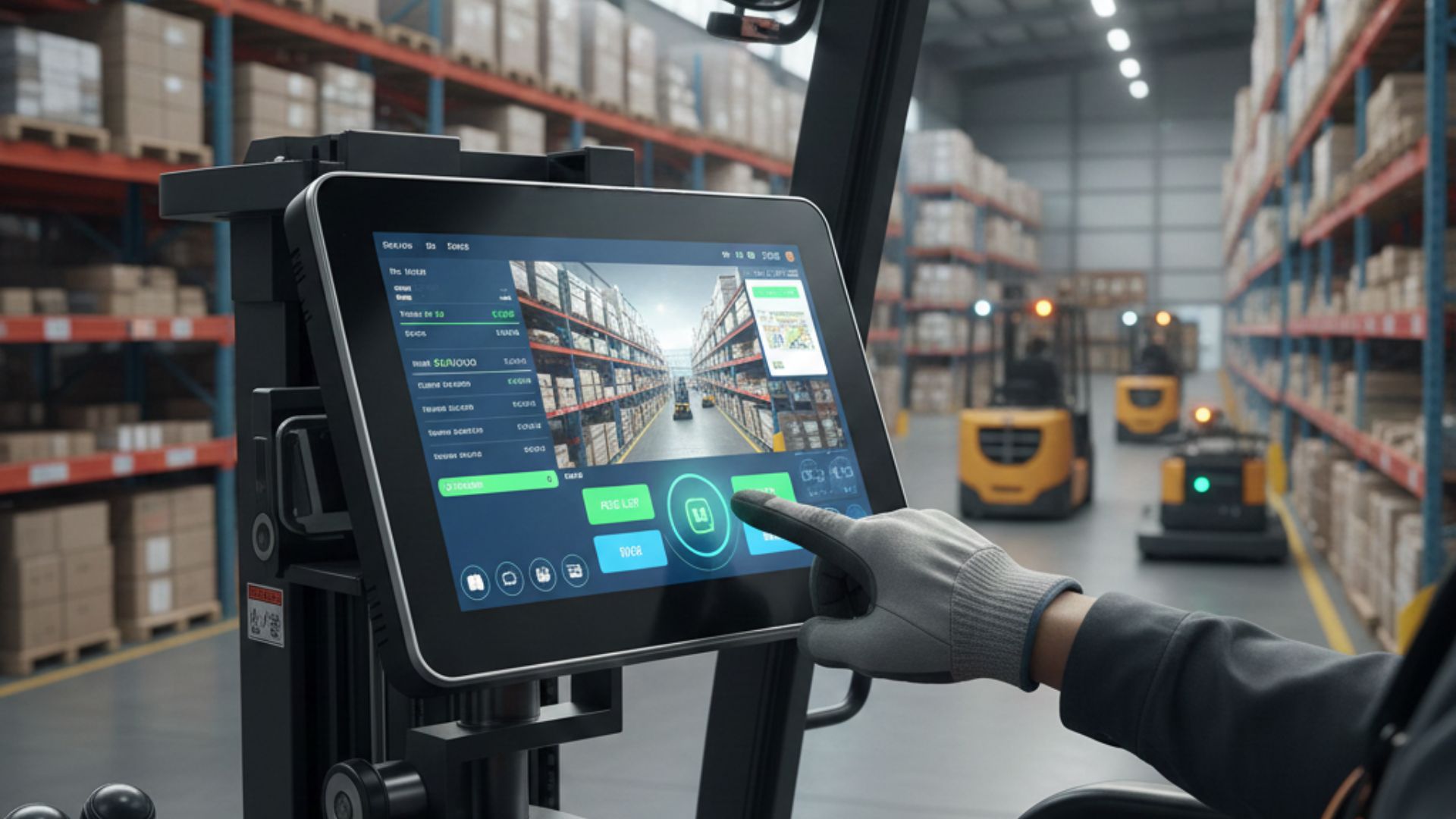
| Limitations of Gloved Operation | Warehouse operators must often wear thick work gloves, which conventional capacitive screens struggle to detect. | Selecting Panel PCs that support a thick glove mode or offer a resistive touch option. |
| Human-Machine Interface (HMI) Design | HMI interfaces should be simple with large icons for quick operation while moving or wearing gloves. | Enhancing operational efficiency and accuracy.
|
Crucial Hardware Specs: Ruggedness and Durability
This section guides readers on how to assess the true rugged characteristics of a Panel PC based on professional specifications.
IP Rating Selection and Significance
| Content Point | Detailed Explanation | Selection Advice |
| Definition and Interpretation of IP Codes | Explaining the significance of the first digit (dust protection level 0-6) and the second digit (water protection level 0-9K) in the IP (Ingress Protection) code. | |
| IP Requirements in Warehouse Environments | General indoor warehouse: minimum IP65 (fully dust-tight, resistant to low-pressure water jets). Cold chain/washdown areas: may require higher IP67. | IP65 is standard; consider IP69K if high-pressure water cleaning is required. |
| Flush Bezel Design | Highlighting how a bezel-free design is easier to clean than traditional raised bezels, effectively preventing dust and liquid residue. | Prioritize models with a full-flat Projected Capacitive (P-Cap) touch. |
Vibration and Shock Resistance Certification
| Content Point | Detailed Explanation | Selection Advice |
| Military Standard: MIL-STD-810G/H | Explaining how this standard simulates the continuous random vibration and momentary shock experienced during transportation, driving, and operation. | The product should have a MIL-STD-810G/H certification report from an independent lab. |
| Anti-Vibration Advantage of Fanless Design | Fanless design, having no moving parts, significantly reduces the risk of components loosening or cables detaching due to vibration. | Fanless Box PCs or Panel PCs are the top choice for mobile environments. |
| Selection of Storage Media | Emphasizing the mandatory use of SSD (Solid State Drive) or eMMC, completely eliminating traditional HDDs to resist shock and vibration. | Check for locking screws or anti-vibration pads securing the storage device. |
Screen Visibility and Touch Technology
| Content Point | Detailed Explanation | Selection Advice |
| High Brightness Requirement | Introducing the unit of screen brightness (nits), emphasizing the need for at least 800 nits, ideally 1000 nits or more, in strong warehouse lighting. | Ask the supplier if an Ambient Light Sensor is provided for automatic brightness adjustment and power saving. |
| Touch Technology Selection: P-Cap vs. Resistive | P-Cap: Advantages are sensitivity and multi-touch; disadvantage is difficulty with thick gloves. Resistive: Advantage is glove operation; disadvantages are lower light transmission and vulnerability to wear. | Prioritize P-Cap screens that support thick glove mode for a balance of durability and user experience. |
| Optical Bonding | Explaining how optical bonding eliminates the air gap between the screen and glass, greatly reducing reflection, preventing moisture condensation, and strengthening the structure. | Optical Bonding is an essential option in outdoor or cold chain warehouse environments. |
In-Vehicle Focus: Power and Mounting Considerations
This section addresses the most complex challenges for Panel PCs mounted on moving vehicles like forklifts and trucks: power management and structural stability.
Wide Voltage Input and Power Protection
| Content Point | Detailed Explanation | Purpose/Impact |
| Necessity of Wide Voltage Design | Car battery voltage is highly unstable ($12V / 24V$), with voltage drops during ignition and potential spikes from charging. The PC must stably accept a wide range, such as $9V \sim 36V$ or even $6V \sim 48V$. | Ensures the Panel PC’s electrical stability during vehicle start-up, shutdown, and driving. |
| Surge Protection and Isolation | Introduction to over-voltage/over-current protection mechanisms to prevent voltage peaks from damaging sensitive electronic components. | Extends motherboard lifespan and prevents system crashes caused by power failure. |
| Selection of Power Connector | Should use industrial-grade, lockable DC-in connectors to prevent loosening from vibration. | Enhances the reliability of the power connection. |
Ignition Delay Functionality
| Content Point | Detailed Explanation | Purpose/Impact |
| Principle of Ignition Delay Operation | The Panel PC connects to the vehicle’s ACC (Accessories) or ignition line. When the vehicle is shut off (ACC power is cut), the PC does not immediately power down but continues to run for a set delay or performs a safe shutdown sequence. | Protects data and prevents work interruption or system damage. |
| Safe Shutdown Mechanism | Explaining how the system safely writes running applications and data to the hard drive before the delay time expires, then fully powers down (Shutdown). | Prevents data loss or operating system corruption due to sudden power loss. |
| Configuration Flexibility and Software Control | A quality in-vehicle Panel PC should allow users to flexibly set the delay time via software to adapt to different workflows (e.g., short breaks vs. extended parking). | Increases usage flexibility and customization. |
Quick Release and Secure Mounting Brackets
| Content Point | Detailed Explanation | Purpose/Impact |
| Vehicle-Specific Anti-Vibration Brackets | Introducing brackets designed for forklift and truck cabins, often featuring multiple joints and shock-absorbing pads to counteract vibration. | Ensures the Panel PC remains secure and steady during movement. |
| VESA and Standardized Installation | Ensuring the Panel PC’s rear adheres to international VESA standards ($75 \times 75$ or $100 \times 100$) for compatibility with universal mounts. | Increases installation flexibility and compatibility. |
| Quick Release Design | Considering maintenance and deployment, a good design should allow operators to quickly remove or install the Panel PC without tools. | Improves maintenance efficiency and reduces vehicle downtime. |
System Integration and Connectivity
This section focuses on how the Panel PC, as a key node in the warehouse information system, efficiently connects and communicates with various peripherals, networks, and backend systems.
I/O Flexibility and Expandability
| Content Point | Detailed Explanation | Purpose/Impact |
| Industrial Serial Ports | RS-232/485/422 ports are standard interfaces for connecting warehouse peripherals like barcode scanners, label printers, and RFID readers. | Ensuring the Panel PC can function as a multi-functional data acquisition center. |
| Multiple USB and GPIO | Needs sufficient USB ports (preferably lockable) for future expansion. GPIO (General Purpose Input/Output) is used to connect simple sensors or trigger switches. | Enhances peripheral compatibility and future expandability. |
| Custom Expansion Slots | Discussing the use of Mini PCIe or M.2 slots in the Panel PC for adding wireless modules, AI accelerator cards, or specific I/O cards. | Meeting the needs for high customization and specific functionality. |
Wireless Networking and Roaming
| Content Point | Detailed Explanation | Purpose/Impact |
| High-Performance Wireless Standards | Emphasizing Wi-Fi 5 (802.11ac) or the newer Wi-Fi 6 standard for higher bandwidth and lower latency. | Ensuring data can be synced in real-time to the WMS system even during peak hours. |
| Seamless Roaming | As forklifts move in large warehouses, the Panel PC must be able to switch quickly and seamlessly between different access points (APs) to avoid data transmission interruptions. | Maintaining operational continuity and preventing delays caused by connection loss. |
| Backup Communication: 4G/5G | In outdoor loading docks or areas with poor Wi-Fi, the Panel PC can switch to a 4G/5G module for data transmission. | Increasing communication reliability and geographic coverage. |
OS and WMS/ERP Compatibility
| Content Point | Detailed Explanation | Purpose/Impact |
| Mainstream Operating System Selection | Windows IoT Enterprise: Strong compatibility, suitable for running traditional WMS clients. Android: More intuitive, suitable for HMI lightweight apps. Linux: Suitable for high customization or proprietary control systems. | Selecting the best compatible platform based on the enterprise’s existing WMS/ERP system. |
| Software Integration and Security | Ensuring the Panel PC has enough processing power to run the WMS client and offers system locking or cybersecurity protection features to prevent non-work-related software installation. | Enhancing system security and operational efficiency. |
| Remote Management Compatibility | Equipment must support mainstream remote desktop or Mobile Device Management (MDM) software for IT personnel to perform maintenance and troubleshooting. | Lowering IT management costs. |
Cost, Maintenance, and Long-Term Service
This section guides readers to evaluate the true value of an industrial Panel PC from the perspective of Total Cost of Ownership (TCO).
TCO Analysis: Industrial vs. Commercial Grade
| Content Point | Detailed Explanation | Conclusion/Benefit |
| Initial Cost Comparison | Acknowledging that the unit price of industrial Panel PCs is typically higher than commercial or consumer tablets. | Clarifying the reasons for the price difference: reinforced components, specialized certifications, small-volume production. |
| Failure Rate and Maintenance Cost | Industrial products have a long Mean Time Between Failures (MTBF) due to rugged design, leading to low maintenance needs. High failure rates of commercial products require frequent repairs or replacement, leading to high downtime costs. | Emphasizing that industrial PCs significantly reduce total maintenance costs over a 3-5 year lifecycle. |
| Downtime Cost Calculation | Estimating the actual economic loss (e.g., wasted labor, delay penalties) resulting from an hour of logistics operation interruption due due to Panel PC failure. | Converting high stability into a quantifiable Return on Investment (ROI). |
Product Lifespan and Long-Term Supply Guarantee
| Content Point | Detailed Explanation | Conclusion/Benefit |
| Long-Term Availability | Commercial product lifecycles are short (6-18 months), while industrial products can last 3-7 years or longer, ensuring stable model supply. | Avoiding the need to re-design or re-certify the entire system quickly due to hardware obsolescence. |
| Version Control and Compatibility | Suppliers commit to high stability of hardware and drivers throughout the product lifecycle, preventing software compatibility issues caused by component changes. | Simplifying IT management, eliminating the need for frequent driver or system testing. |
| Spare Parts and Repair Stock Guarantee | Even after a product is discontinued, the supplier should provide years of repair service and spare parts inventory. | Ensuring the system receives reliable logistical support years later. |
After-Sales Service and Technical Support
| Content Point | Detailed Explanation | Conclusion/Benefit |
| Professional Technical Consultation | Suppliers need expertise in providing solutions for warehouse-specific issues (e.g., CAN Bus integration, voltage instability). | Ensuring the procured Panel PC can be smoothly integrated into existing, complex industrial systems. |
| RMA Process and Speed | Discussing whether the supplier’s Return Merchandise Authorization (RMA) process is efficient and transparent, and if they offer quick turnaround service or loaner units. | Reducing operational downtime caused by repair wait times. |
| Customization Services | Discussing the flexibility of customization based on specific warehouse needs (e.g., adding/removing I/O ports, chassis color, customer logo printing). | Meeting the needs of specific projects and brand image. |
Frequently Asked Questions (FAQ)
This section summarizes and reinforces key points from the preceding text, addressing practical issues customers may encounter during procurement.
Panel PC Troubleshooting Q&A
| Frequent Question (Q) | Professional Answer (A) | Core Concept |
| Q1: Why is my Panel PC touchscreen slow to respond in low temperatures? | A: This is common for capacitive touchscreens. Check if your device has low-temperature startup and a heating module. If not, choose an industrial-grade Panel PC with a wide operating temperature range and optimized screen materials. | Wide Temperature Design, Screen Materials |
| Q2: The Panel PC often loses power suddenly after the forklift is shut off, how to fix this? | A: This is because the Panel PC lacks the Ignition Delay function. You need to configure a vehicle-mounted Panel PC or Box PC with an ACC connection and a safe shutdown mechanism. | Ignition Delay, Power Protection |
| Q3: Screen reflection is severe, affecting data entry accuracy, what to do? | A: We recommend using a Panel PC with 1000 nits or more high brightness and employing Optical Bonding technology, which significantly reduces ambient light reflection. | Optical Bonding, High Brightness Screen |
Upgrade and Retirement Cycle
| Content Point | Detailed Explanation | Purpose/Impact |
| Recommended Replacement Cycle | The recommended lifespan for industrial Panel PCs is typically 5 to 7 years. Replacement is mainly considered when OS updates, new communication standards (e.g., Wi-Fi 6/5G), or performance can no longer meet new WMS demands. | Providing clear asset planning guidance. |
| Retirement Evaluation Metrics | Retirement should be considered when maintenance costs start to increase significantly (e.g., exceeding 30% of new unit cost) or the hardware can no longer run the latest security updates and WMS versions. | Helping businesses make sound asset decisions. |
Energy Efficiency and Standby Modes
| Content Point | Detailed Explanation | Purpose/Impact |
| Energy Saving Settings | Recommend enabling the automatic screen sleep function or using an Ambient Light Sensor for automatic brightness adjustment to reduce unnecessary power consumption. | Aligning with green warehousing and energy saving goals. |
| Low Power Modes | Selecting models with low-power processors like Intel Atom or ARM to reduce heat generation and lessen the burden on the vehicle’s battery. | Improving battery life and thermal stability. |
About Beyond Info System
This section serves as a brand introduction and a final Call-to-Action (CTA).
Beyond Info System’s Focus and Advantages
| Content Point | Statement and Commitment | Brand Advantage |
| Industry Experience | Beyond Info System has over 8 years of experience in the industrial PC industry, specializing in providing rugged computing solutions for logistics, warehousing, and in-vehicle applications. | Professionalism and Experience Accumulation. |
| Solution Capabilities | We provide not just hardware, but also power protection, ignition delay firmware, and customized I/O integration one-stop solutions. | Customization and Technical Depth. |
| Quality and Service Commitment | All products undergo rigorous environmental testing, come with long-term supply guarantees, and offer fast-response after-sales service, making us a reliable partner for your TCO optimization. | Reliable Quality and Long-Term Support. |