Introduction to Panel PC Mounting Solutions
Why Choosing the Right Mounting Method Matters
In the realm of industrial automation, the longevity and reliability of an Industrial Panel PC are not solely dependent on its internal components. The method of installation—the “mounting”—is a critical architectural decision. A poorly chosen mounting strategy can lead to mechanical stress, overheating due to blocked airflow, or even structural failure in environments prone to high vibration. Conversely, the right mounting solution optimizes the interaction between the operator and the machine (HMI), ensures the safety of the hardware in harsh conditions, and maximizes the use of limited floor space in a smart factory setting.
Factors to Consider: Environment, Surface, and Accessibility
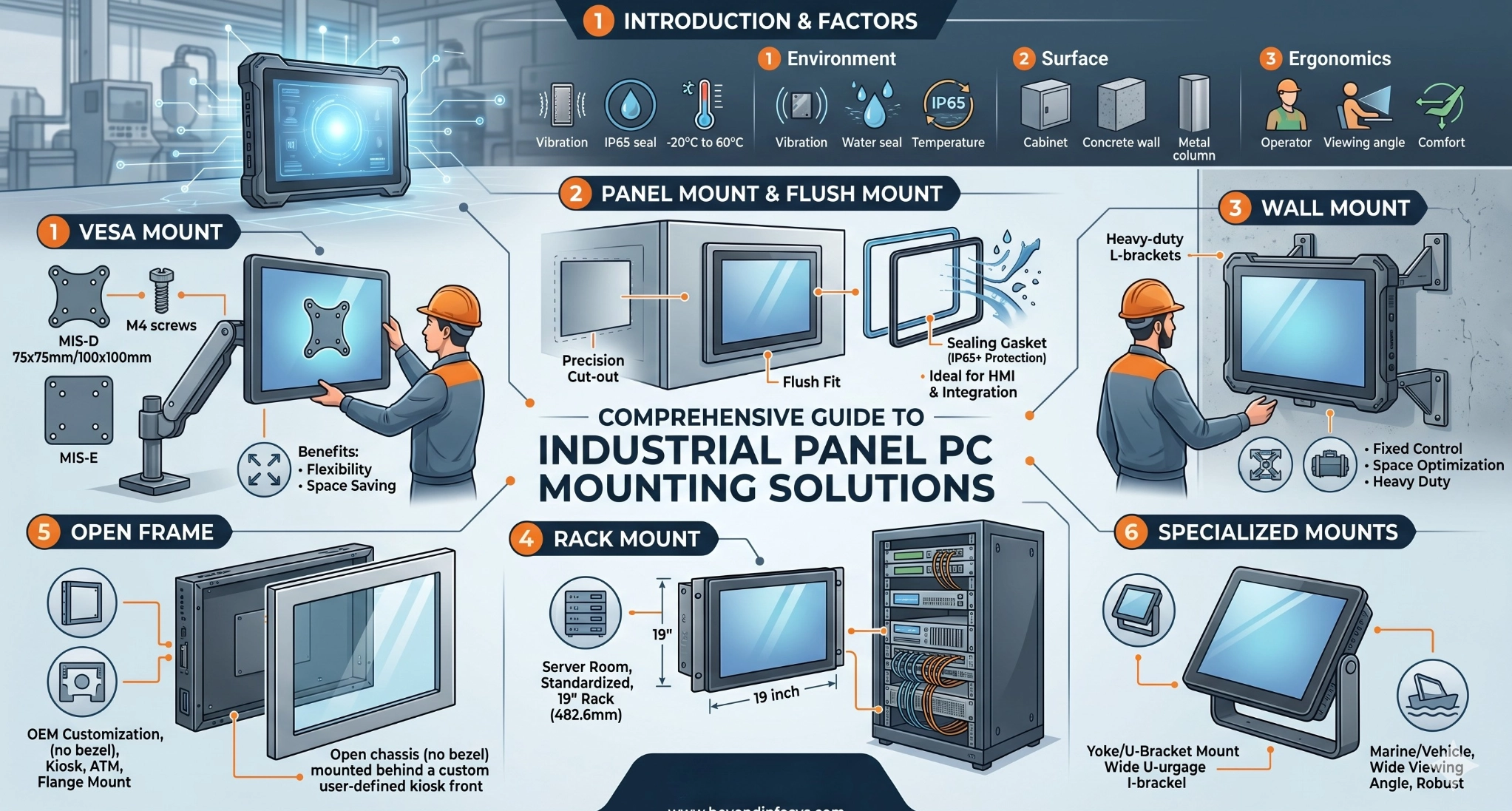
Before selecting a mounting hardware kit, engineers and system integrators must conduct a thorough site assessment. The choice is often dictated by three primary pillars:
- Environmental Stressors: Is the device exposed to high-pressure water jets (requiring IP65+ sealing), or is it mounted on a CNC machine subject to constant 5G shocks?
- The Mounting Surface: Is the PC being integrated into a thin sheet-metal control cabinet, a heavy-duty steel pillar, or a standalone kiosk?
- Human Factors (Ergonomics): Does the operator need to sit or stand? Should the screen tilt to avoid glare from overhead factory lights? Accessibility for maintenance—how quickly a technician can swap out a unit—is also a major ROI factor in minimizing downtime.
VESA Mount: The Industry Standard for Flexibility
Understanding VESA Standards (MIS-D, MIS-E, MIS-F)
The Video Electronics Standards Association (VESA) created the Flat Display Mounting Interface (FDMI) to standardize how monitors and Panel PCs attach to stands and arms. In the industrial sector, standardized hole patterns allow for a “plug-and-play” ecosystem of mounting accessories.
- VESA MIS-D (75×75 mm or 100×100 mm): This is the most prevalent standard for industrial displays ranging from 10.1″ to 24″. It typically utilizes M4 screws.
- VESA MIS-E (200×100 mm): Often used for larger, heavier panels (27″ to 32″) requiring a wider footprint for weight distribution.
- VESA MIS-F (Various patterns like 400×400 mm): Found in large-scale digital signage or overhead production monitors.
Benefits of Using VESA Arms and Stands
VESA mounting offers unparalleled versatility. Using articulating arms allows the Panel PC to be moved out of the way when not in use, or adjusted for different operator heights. This is particularly useful in laboratories or cleanrooms where desk space is at a premium.
| Mounting Sub-type | Best Use Case | Key Advantage |
| Articulating Arm | Quality Control Stations | Full 3D movement and tilt |
| Fixed Desk Stand | Shipping & Logistics Hubs | Simple setup, no drilling required |
| Ceiling Mount | Production Line Overhead | Keeps floor space 100% clear |
Panel Mount & Flush Mount: Seamless Integration
The Precision of Cut-out Installation
Panel mounting is the “gold standard” for cabinet integration. This method involves cutting a precise rectangular opening in a metal panel or machine console. The Panel PC is inserted from the front, and secured from the back using specialized mounting clips or clamps. The result is a “Flush Mount” appearance where only the bezel of the PC is visible. This creates a streamlined, professional look that is essential for high-end machinery and medical equipment.
IP Rating and Sealing for Harsh Environments
One of the greatest technical advantages of panel mounting is the ability to create a hermetic seal. Most industrial Panel PCs come with a rubber gasket pre-installed on the rear of the front bezel. When the mounting clips are tightened against the cabinet wall, this gasket compresses, preventing dust, oil, and water from leaking into the cabinet interior. This is critical for maintaining an IP65 or IP66 rating, protecting the sensitive internal electronics of both the PC and the control cabinet from the washdown procedures common in food and beverage plants.
Wall Mount & Rack Mount Solutions
Wall Mounting for Fixed Industrial Control
Wall mounting is often used for fixed HMI (Human Machine Interface) stations where the operator does not need a mobile arm. It uses a heavy-duty bracket—often in a two-piece “hook-and-slide” design—that allows the PC to be securely bolted to a vertical surface. In industrial environments, these brackets are usually made of reinforced steel or aluminum to handle the weight of ruggedized, fanless chassis which often feature heavy internal heat sinks.
19-inch Rack Mount for Server Room Integration
In data centers or centralized automation hubs, Panel PCs are often mounted into standard 19-inch racks. This requires a specific “Rack Mount” bezel that extends the width of the device to the standard 19-inch (482.6 mm) dimension. This setup is ideal for managing multiple systems in a high-density environment, allowing for organized cable management and easy access to the rear I/O ports through the back of the rack.
Open Frame and Specialized Mounting Techniques
Open Frame Solutions for Custom Enclosures
For OEM (Original Equipment Manufacturer) customers building self-service kiosks, ATMs, or specialized medical carts, the “Open Frame” mount is the most efficient choice. Open frame Panel PCs lack a finished front bezel; instead, they feature integrated mounting flanges on the sides. This allows the designer to mount the display behind a custom glass or metal frontage, ensuring the PC perfectly matches the aesthetic and functional design of the larger machine.
Side Mounting and Yoke Mounting Options
- Side Mount: Often used in vehicular applications (trucks, forklifts), side mounting utilizes the threaded holes on the sides of the PC chassis to secure it into a “U-bracket” or custom cage.
- Yoke (U-Bracket) Mount: This allows the device to rotate on a single axis. It is highly valued in marine environments or outdoor oil and gas fields, where the screen must be tilted significantly to accommodate different viewing heights or to shield the screen from direct sunlight.
Frequently Asked Questions (FAQ)
How to choose between Panel Mount and VESA Mount?
The choice depends on the “Skin” of your machine. If the PC is the “face” of a control cabinet, Panel Mount is necessary for sealing and aesthetics. If the PC is a peripheral device (like a station for a worker to scan barcodes), a VESA Mount on an arm provides better ergonomics.
What is “Front-Access” Mounting?
Some advanced Panel PCs allow for mounting and unmounting entirely from the front. This is crucial for systems where the back of the cabinet is inaccessible. Beyond Info System offers specific models with front-accessible screw holes to simplify maintenance in these tight spaces.
Can VESA mounts handle high-vibration environments?
While VESA is versatile, in high-vibration settings (like mining equipment), standard VESA arms may “droop” or fail over time. In these cases, we recommend Yoke Mounting or Panel Mounting, which provide more points of contact and mechanical stability.
Explore Beyond Info System’s Industrial Computing Solutions
High-Performance Industrial Panel PCs & Displays
At Beyond Info System, we specialize in engineering computing solutions that go beyond the desktop. Our Panel PCs are designed with “Mounting Agility” in mind. Whether you require a high-brightness screen for outdoor sunlight readability or a fanless, stainless steel PC for chemical resistance, our hardware supports every mounting configuration discussed in this guide. Our products are rigorously tested for thermal efficiency and structural integrity, ensuring that no matter how you mount them, they perform 24/7.
Custom OEM/ODM Services for Diverse Mounting Needs
Every industrial project has unique constraints. Beyond Info System is more than a hardware vendor; we are your technical partner. We offer:
- Custom Bezel Design: For specific cut-out requirements.
- Branding & Private Labeling: Integrating your logo into the mounting face.
- Global Compliance: Ensuring your mounting solution meets CE, FCC, and RoHS standards for the European and global markets.
For more information on our product range and to find the perfect fit for your next project, visit our website.
- Official Website: www.beyondinfosys.com
- Featured Categories: Industrial Touch Panel PCs, Rugged Displays, Stainless Steel IP66/IP69K Series, and Open Frame Solutions.