Industrial touch panel PCs often operate in environments where an unexpected shutdown can interrupt production, stop a self-service terminal, delay warehouse operations, or require a technician to travel to a remote site. For these applications, buyers need more than a successful power-on check before shipment. They need evidence that the assembled system can remain stable under sustained operation.
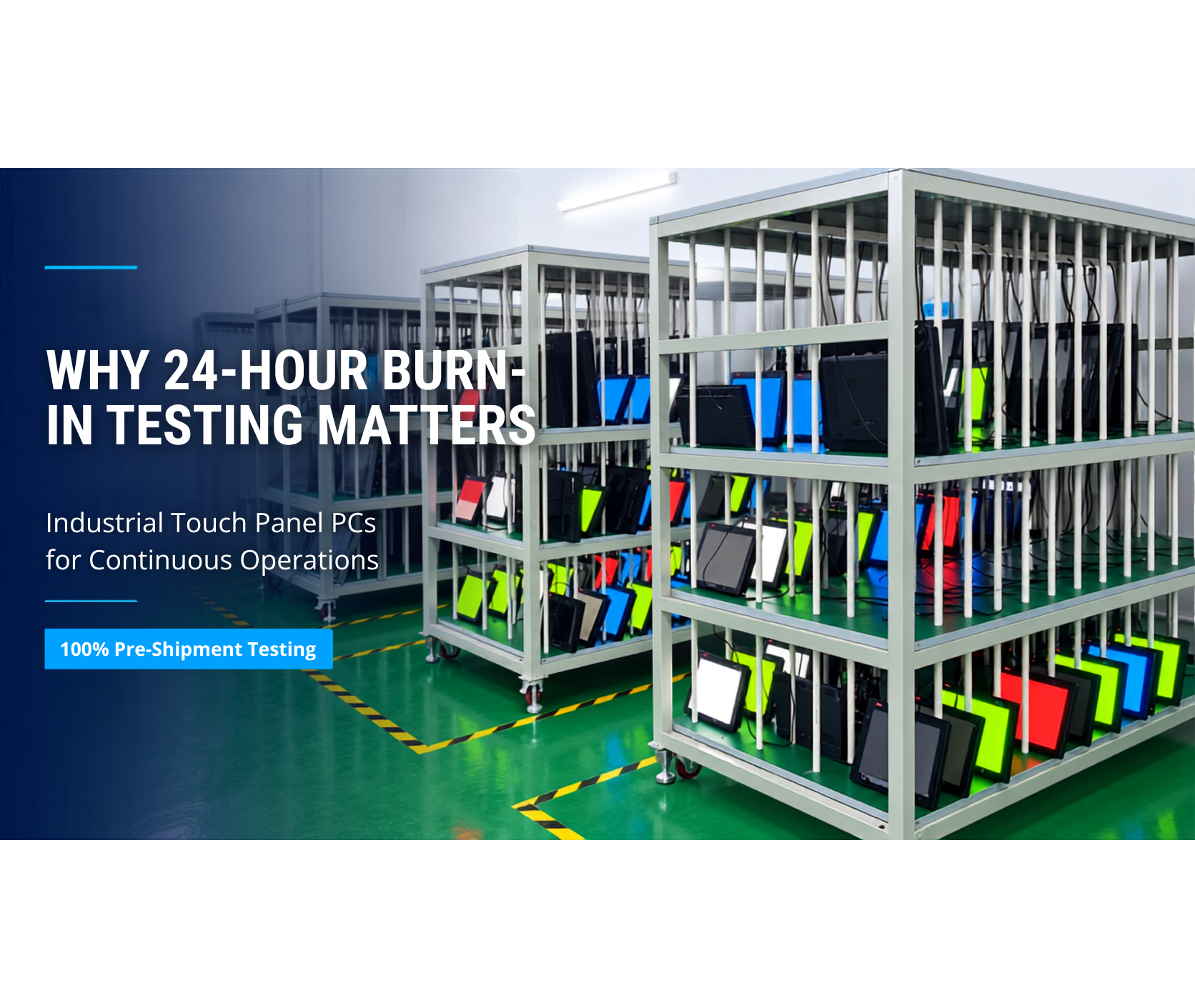
Burn-in testing addresses this requirement by operating a completed computer for an extended period while critical functions are active. Beyond Info System (BIS) applies an 24-hour burn-in test to 100% of systems before shipment, followed by functional verification. The objective is practical: identify potential assembly, thermal, power, storage, memory, and configuration problems before the unit reaches the customer.
An 24-hour system burn-in test is not the same as component qualification testing, an MTBF calculation, or a guarantee that equipment will never fail. It is a production-screening step that provides additional evidence between final assembly and shipment. For system integrators and OEMs deploying industrial panel PCs in continuous-operation environments, this screening process can help reduce avoidable commissioning problems and improve confidence in every delivered unit.
What Does Industrial Touch Panel PC Burn-In Testing Evaluate?
A basic functional test confirms that a computer starts and that selected interfaces respond. Burn-in testing evaluates system behavior over time.
This distinction matters because some problems may not appear during a short inspection. A loose connection may remain unnoticed until the unit warms up. An unstable memory module may pass the initial boot process but produce errors under sustained load. A storage device may appear normal until repeated read and write activity exposes a problem.
During an industrial panel PC burn-in test, the assembled unit operates in a controlled production environment while technicians monitor system behavior. The test profile should reflect the system configuration and intended product family.
Typical observations include processor and system temperatures, memory stability, storage health, power behavior, display output, network connectivity, and operating-system logs. Panel PCs may also require checks of the touch controller, display, backlight, and external interfaces.
The value of system-level burn-in testing is that it evaluates how components work together rather than treating each part in isolation. A processor, memory module, power adapter, storage device, cable, and operating-system image may each meet their individual specifications. The completed system can still develop problems if those parts are installed incorrectly, configured incompatibly, or placed in an enclosure with inadequate thermal contact.
System-level screening is designed to help reveal these integration issues before shipment.
Why Continuous Operations Increase the Cost of Early Failures
The cost of a failed industrial touch panel PC is rarely limited to the price of the hardware. An unstable controller can interrupt a machine, prevent data collection, stop an HMI, or delay a customer’s acceptance test.
Direct costs may include replacement freight, technician time, production downtime, remote troubleshooting, and project delays. The commercial impact can be even greater when a system integrator must explain a preventable failure to its end customer.
Continuous-operation environments also provide fewer opportunities to restart, inspect, or replace a computer. A kiosk may be installed outdoors. A controller may sit inside a machine cabinet. A panel PC may be integrated into a food-processing line that can only be serviced during a planned shutdown.
In these applications, a problem discovered after deployment can be significantly more expensive than the same problem identified during factory screening.
Burn-in testing cannot reproduce every field condition, and it should never replace correct product selection. Protection ratings, operating-temperature specifications, shock and vibration requirements, input voltage, mounting, and application software still need to match the deployment.
Instead, burn-in testing supports the engineering process by checking whether the completed system behaves consistently before it leaves production.
What Problems Can an 24-Hour Burn-In Test Help Identify?
No single test can detect every possible failure mode. However, eight hours of sustained operation provides more opportunities to observe intermittent or temperature-related behavior than a brief power-on inspection.
Several problem categories are particularly relevant to completed industrial touch panel PCs.
Thermal Assembly and Heat Transfer
Fanless industrial touch panel PCs rely on conductive and passive heat transfer. The processor transfers heat through thermal interface materials, heat spreaders, and the metal enclosure.
Incorrect assembly pressure, misplaced thermal material, or poor contact can increase operating temperatures. A sustained run gives the system time to reach a stable thermal condition and allows technicians to compare temperatures with the expected profile for that configuration.
Memory and Storage Stability
Memory and storage faults can be intermittent. Sustained workloads and repeated access can expose errors that may not appear during startup.
Screening can also identify an incorrectly installed memory module, an unsuitable storage configuration, or a system image that generates recurring errors. When a fault appears, the unit can be isolated and corrected before packing.
Power and Configuration Problems
Industrial panel PCs may include wide-voltage inputs, external adapters, ignition control, expansion modules, or customized I/O.
A longer operating test provides time to observe voltage-related instability, unexpected restarts, driver conflicts, device-recognition problems, and operating-system events. Where the production procedure requires power cycling, technicians can also confirm that the system starts consistently after controlled shutdowns.
Display, Touch, and Interface Behavior
For a panel PC, the computer is only one part of the delivered system. The LCD, backlight, touch controller, USB interfaces, serial ports, LAN ports, and other configured connections must operate together.
A system can pass a visual inspection yet develop a display, touch, or communication issue after warming up. An extended test window increases the opportunity to detect such behavior before shipment.
What Does an 24-Hour Burn-In Test Mean?
Test duration should be described precisely.
BIS uses an 24-hour burn-in process as a production-screening control for every shipped system. It should not be presented as a universal industry requirement because appropriate test duration and conditions depend on the product, risk level, contract, and application.
Some regulated, military, or customer-specific programs may require separate qualification procedures or longer environmental testing.
An 24-hour burn-in test also does not create an MTBF figure. Mean time between failures is a statistical reliability measure based on defined data and assumptions, while production burn-in is an inspection process applied to individual units.
Conflating the two can mislead technical buyers. Clear documentation should state the test duration, workload, monitored parameters, pass criteria, and whether testing occurs at ambient temperature or under another defined condition.
A strong quality process combines burn-in screening with incoming inspection, controlled assembly, functional testing, configuration verification, traceability, and final inspection. Burn-in adds value within that process; it does not compensate for unsuitable component selection or poor production control.
The BIS 100% Burn-In and Production Screening Process
BIS uses a structured manufacturing sequence that begins with material preparation and inspection. Subassemblies are completed before the main system is integrated, with attention to cable routing, component alignment, cooling interfaces, and enclosure assembly.
The completed unit then proceeds through burn-in and functional verification before packing.
Every shipped BIS industrial touch panel PC undergoes an 24-hour burn-in test. The exact workload and checks can vary according to the hardware platform and agreed customer configuration.
The purpose is to exercise the completed system long enough to identify abnormal behavior that may not appear during a brief inspection. Systems that show instability are removed from the normal shipping flow for diagnosis and corrective action.
After burn-in, functional testing confirms the ordered hardware and configuration. Depending on the product, verification may include:
- Processor and memory identification
- Storage capacity
- Operating-system image
- Network ports
- Serial ports
- USB ports
- Display output
- Touch operation
- Expansion devices
- Customer-specific settings
Packing begins only after the unit passes the required checks.
This 100% system-screening approach is particularly useful for low-MOQ and customized projects. Small projects often contain different processors, storage capacities, I/O layouts, firmware settings, or mechanical requirements.
Testing every completed unit avoids relying only on a sample from a batch whose individual configurations may differ.
How Should System Integrators Evaluate a Supplier’s Burn-In Test?
The phrase “burn-in tested” is too broad to support a purchasing decision by itself.
System integrators should ask suppliers for a practical description of their testing process. The answer does not need to disclose proprietary factory details, but it should be specific enough to distinguish a controlled screening procedure from a simple power-on check.
Five questions are particularly useful:
- Is every unit tested or only a sample?
- How long does the burn-in test run?
- Which functions or workloads are active?
- What data or events are monitored?
- What happens when a unit fails?
Buyers should also determine whether the test applies to the exact ordered configuration, particularly when the project includes custom I/O, an operating-system image, BIOS settings, or third-party expansion devices.
For critical deployments, the customer and supplier should agree on acceptance criteria before production. A system integrator may require a defined software image, network test, repeated reboots, storage checks, touch verification, or a report linked to serial numbers.
These requirements should be included in the project specification so that production and acceptance teams evaluate the same conditions.
Burn-In Testing for Customized and Low-MOQ Industrial PC Projects
Low-volume orders do not reduce the cost of a field failure. In some cases, the impact can be greater because each unit may support a specialized machine, trial installation, or customer acceptance milestone.
A single unstable sample can delay validation and make an otherwise suitable platform appear unreliable.
BIS supports low-MOQ projects and customization of processor, memory, storage, I/O, firmware, operating system, enclosure, and branding. These options help OEMs match hardware to the application, but they also increase the importance of configuration control.
The production team must verify that the physical system, firmware settings, software image, and order record all match.
An 24-hour test provides a consistent screening window before delivery. For projects with higher risk or formal compliance requirements, BIS can review additional validation needs during the quotation and engineering stage.
The required test scope should be determined by the operating environment and the customer’s acceptance requirements rather than assumed after production has started.
How Burn-In Testing Supports Total Cost of Ownership
A lower purchase price does not necessarily produce a lower total cost when systems require repeated troubleshooting or replacement.
Quality screening is one of several controls that can help reduce preventable deployment costs. It is particularly relevant when replacement access is difficult, international freight is expensive, or downtime affects a production line.
The commercial benefit comes from identifying problems earlier. A unit flagged during factory screening can be diagnosed without arranging an RMA, dispatching a technician, or interrupting the customer’s operation.
Burn-in testing does not guarantee zero field failures, but it moves a useful part of risk control to a stage where correction can be faster and less disruptive.
Procurement teams should therefore compare supplier processes as well as specifications and price. Two industrial computers with similar processors, memory, and displays may carry different operational risks if one supplier tests only basic functions while another applies documented system-level screening to every unit.
Frequently Asked Questions About Industrial Panel PC Burn-In Testing
Is an 24-hour burn-in test enough for a continuous-operation industrial touch panel PC?
Eight hours is a production-screening period, not a simulation of the product’s full service life. Its value depends on the workload, monitoring, pass criteria, and surrounding quality process.
Critical or regulated applications may require additional environmental, compliance, or customer-specific validation.
Does burn-in testing guarantee that an industrial touch panel PC will never fail?
No. Burn-in testing helps identify certain early, intermittent, thermal, power, and configuration problems before shipment.
Reliability also depends on product selection, component quality, thermal design, installation, power quality, software, maintenance, and field conditions.
Is burn-in testing the same as MTBF testing?
No.
Burn-in is a production-screening activity performed on individual systems. MTBF is a statistical reliability measure based on a defined model or field data.
An 24-hour burn-in result should not be presented as an MTBF claim.
Does BIS test every industrial touch panel PC?
Yes. BIS applies its 24-hour burn-in process to 100% of systems before shipment, followed by functional verification.
Project-specific tests can also be discussed when an application requires additional checks or documented acceptance criteria.
Can customers request a customized test procedure?
Yes. Customers should provide the required workload, software image, connected devices, interfaces, operating conditions, and acceptance criteria during the quotation or engineering stage.
BIS can then review feasibility, equipment needs, documentation, cost, and lead-time impact.
What should be included in an industrial touch panel PC test record?
Useful records may include the product model, serial number, hardware configuration, software image, test date, test duration, selected results, operator or station identifier, and final disposition.
The appropriate level of documentation depends on the project and customer requirements.
Conclusion
Industrial touch panel PC reliability begins with correct engineering and continues through controlled assembly, screening, and verification.
An 24-hour burn-in test gives a completed system time to reveal certain problems that a brief power-on check may miss. When applied to every shipped unit and followed by functional verification, the process provides system integrators and OEMs with stronger evidence that the ordered configuration was tested before delivery.
BIS combines 100% 24-hour burn-in screening with low-MOQ support, configurable industrial computing platforms, and project-specific engineering review.
If your application requires an industrial touch panel PC or a customized test procedure, send BIS your operating environment, interface requirements, system configuration, and expected deployment schedule. Our team will review the specification and recommend a practical hardware and validation plan.